
Go to: https://wscjtc.acadisonline.com/
Note that you cannot change your password if your account is locked. CJTC unlocks accounts each business day.
Use the Reset Your Password link in the Sign In box on the portal page.
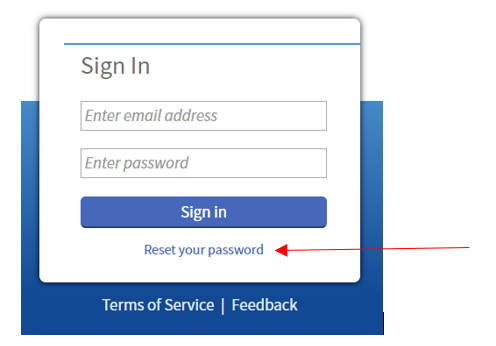
- You'll receive a link in your email.
- You must send the reset password link to the email that is on your user profile. Unless otherwise specified, that should always be your agency email.
- Emails can take up to 30 minutes to receive.
- Requesting multiple password reset emails, will result in the links not working properly.

- Check your junk folder or spam filter if you do not see the Password Help email withing 30 minutes
- Your agency may need to add @acadisonline.com and @cjtc.wa.gov domains to approved lists.
- If your agency has recently changed your email address, you may need to contact CJTC to have your records updated before resetting your password will work.
- You can contact CJTC to see if it is necessary to contact your agency IT department to adjust your email filters.
Enter your new password.

- Password rules are listed on the right of the page.
- If your password is accepted, it will log you directly into the WSCJTC Acadis Portal.
- If the page refreshes and does not log you into the portal, one or more of the rules have not been met and your password will need to be modified.
- Clear your browser’s cache after resetting your password to ensure that it saves the correct password in the password manager.
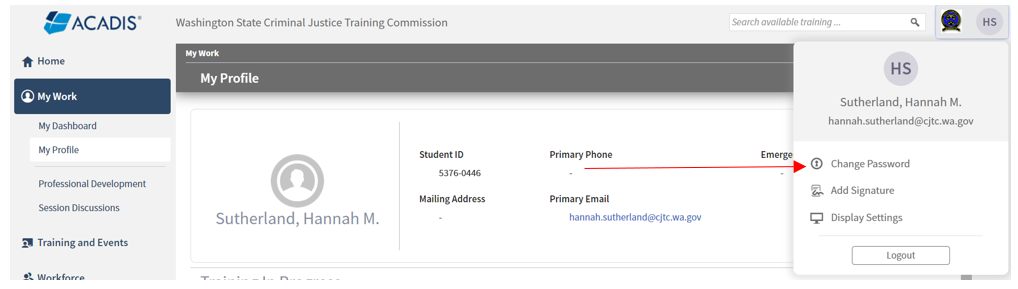
You can also change your password inside the portal as well.
- Clear your browser’s cache after resetting your password to ensure that it saves the correct password in the password manager.